
You don’t need “more AI.”
You need a version of ChatGPT that actually thinks like your brand.
Most marketing teams do the same thing:
open a fresh chat
throw in a random prompt
get something vaguely okay-ish
spend 30 minutes rewriting it so it doesn’t sound like a robot who’s had too much LinkedIn
The problem isn’t ChatGPT.
The problem is how you’re using it.
In this guide, we’ll walk through how smart marketing teams set up ChatGPT properly:
Organised projects instead of messy one-off chats
A clear brand bible + tone of voice baked in
Reusable prompts and workflows for social, ads, email, and content
By the end, you’ll know how to make ChatGPT feel less like a random tool and more like a junior marketer who’s actually been onboarded.
1. Why Your Team Needs a “Branded” ChatGPT (Not a Generic One)
Most teams start with:
“Write a social media post about [topic].”
ChatGPT shrugs, does its best, and gives you something that sounds like every other brand on the internet.
That’s what happens when you use a generic ChatGPT.
A branded ChatGPT, on the other hand, knows:
Who you are
Who you sell to
What you stand for (and what you’d never say)
How you sound on your best day
What’s already working in your marketing
Think of it like this:
Generic ChatGPT = “freelancer from the internet who’s never met you.”
Branded ChatGPT = “assistant who’s sat through your brand training.”
The goal is simple:
Brief ChatGPT once, reap the benefits every day.
2. Foundations First: Get Your Brand Assets AI-Ready
Before we even talk about prompts, let’s make sure you’re not feeding ChatGPT crumbs and expecting cake.
Here’s what smart teams have ready before they start:
2.1 Decide the role of ChatGPT in your marketing team
ChatGPT is not here to “replace your copywriter.”
It’s here to speed up the boring bits and unlock more creative surface area.
Most teams use ChatGPT for:
Ideation – campaign angles, content ideas, hooks
Drafting – first drafts for social, emails, and ads
Repurposing – turning one asset into many
Research support – structure, outlines, FAQs, voice of customer synthesis
Humans still own:
Strategy
Positioning
Final copy and quality control
AI is the accelerator, not the driver.
2.2 Gather your non-negotiable brand assets
This is the stuff you want to upload, paste, or summarise into ChatGPT so it stops guessing.
Create a Google Drive folder called something like:
AI Ready – [Your Brand Name]
Inside it, gather:
Brand Bible / Brand Guidelines
Visual identity is nice, but for ChatGPT you mainly want messaging, values, and language rules.Tone of voice guide
If you don’t have a formal one, pull together:3–5 on-brand examples of copy (social posts, emails, blog intros, ads)
3–5 off-brand examples and why they’re wrong
Audience personas / ICPs
Clear snapshots of who you’re talking to, their pains, goals, and language.Offer breakdowns
One-pagers that explain each product/service, who it’s for, and why it exists.Compliance / “never say this” rules
Industries like finance, health, education, etc. especially:Banned phrases
Claims you can’t make
Formatting requirements
Top-performing assets
Screenshots or copy of:Best-performing ads
Social posts that got real engagement
Emails with high open/click rates
These become the training wheels for ChatGPT’s understanding of your brand.
3. Stop Using Random Chats: Set Up Projects Instead
If your ChatGPT looks like:
“Untitled chat 1, Untitled chat 2, Oops where’s that prompt from last week”
…it’s time for a reset.
Smart teams think in projects instead of one-off chats.
3.1 Think in “workstreams”, not “prompts”
Set up separate ongoing chats or workspaces for each core area of marketing, for example:
Project: Brand & Messaging Hub
Where you define and refine brand voice, positioning, key messages.Project: Organic Social (LinkedIn / IG / TikTok)
For content ideas, calendars, and daily posts.Project: Paid Ads (Meta / Google / LinkedIn)
For ad angles, variations, and testing ideas.Project: Email & CRM
For campaigns, nurture sequences, and automations.Project: Content & SEO
For outlines, long-form blogs, repurposing, and meta tags.
Each project gets:
A clear goal (e.g. “help us ship 20 high-quality LinkedIn posts per month”)
A pinned brand + channel-specific brief
A set of go-to prompts your team reuses
Result: ChatGPT remembers more context, you spend less time repeating instructions, and your outputs get more consistent.
4. Teaching ChatGPT Your Brand, Tone of Voice, and Rules
This is where the magic happens.
4.1 Upload your brand bibles and assets
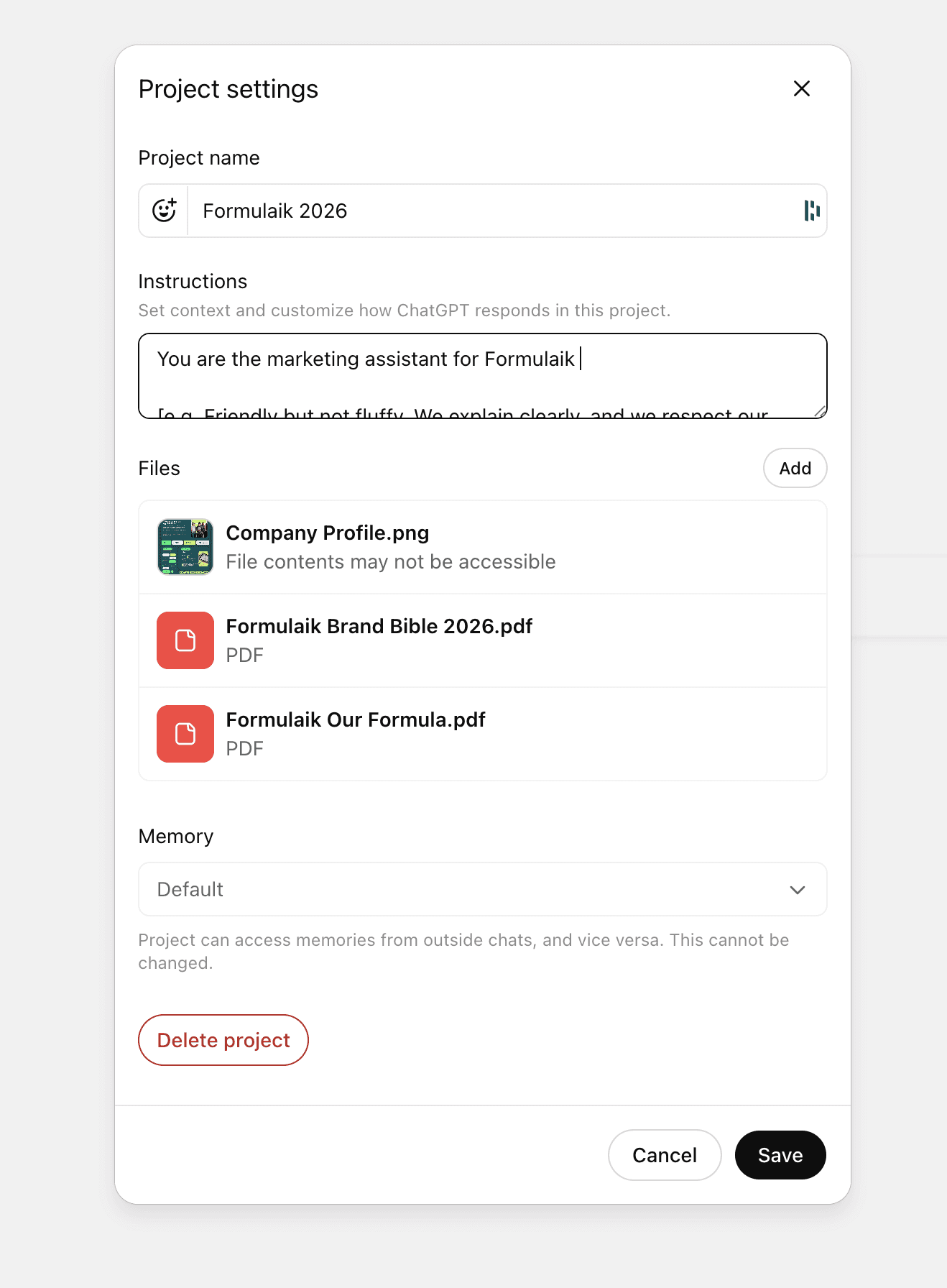
In your Brand & Messaging project, start the conversation with something like:
“You are a marketing assistant for [Brand Name]. I’m going to share our Brand Bible, tone of voice guidelines, and some example content. Learn these and ask me follow-up questions if anything is unclear.”
Then:
Upload or paste the Brand Bible / key sections
Paste your tone of voice guide or examples
Paste 3–5 examples of on-brand content
Paste anything you never want to see in your copy
Once that’s in, ask:
“Summarise our brand voice in 3–5 bullet points. Include how we sound, what we care about, and what we never do.”
Review the answer:
If it feels right → great, we move on
If it’s off → correct it in plain language, and tell ChatGPT to update its understanding
4.2 Create your “Brand System Prompt”
This is the block of text your whole team can reuse in any project.
Think of it as your AI brand onboarding in one prompt.
Example (adapt for your brand):
System Prompt: Brand Voice & Role
You are the marketing assistant for [Brand Name], a [short description of what you do and who you serve].
Audience:
We speak to [describe your core audience in 2–3 lines: roles, pains, goals, how they see the world].Tone of voice:
[e.g. Friendly but not fluffy. We explain clearly, and we respect our reader’s time.]
[e.g. We sound like a smart peer, not a corporate press release.]
[e.g. We avoid buzzwords and over-the-top hype.]
Writing rules:
Use simple, direct language.
Avoid clichés like “revolutionary” or “cutting-edge”.
Prefer short paragraphs and scannable structure.
Always include a clear next step or call-to-action where relevant.
Compliance / boundaries:
Never [claim X].
Don’t mention [banned words / topics].
Goal:
Help our marketing team ideate, draft, and refine content that is always on-brand and useful, across social, email, ads, and content.
Always ask 1–2 clarifying questions if the task is ambiguous.
Your team can copy-paste this into the first message of each new project/chat.
4.3 Sanity-check the tone
Before you let your team loose with this, test it:
Try:
“Using everything you know about our brand, write a LinkedIn post introducing us to someone who’s never heard of us. Keep it under 150 words.”
Then:
“Now rewrite this same post with:
Version A: more playful
Version B: more serious
Version C: more punchy and direct”
This gives you range.
Pick the version that feels most “you” and say:
“This is the tone I want you to default to. Analyse it and describe what you notice about the language, structure, and rhythm.”
That extra step helps ChatGPT lock in your voice.
5. Core Use Cases: How Smart Teams Use ChatGPT Day-to-Day
Now the fun part: what you can actually do with this setup.
5.1 Social media: posts, hooks, and content schedules
a) Generate content ideas based on pillars
Once you define your content pillars (e.g. “Education”, “Behind the Scenes”, “Customer Stories”, “Spicy Opinions”), you can ask:
“Based on our brand and audience, suggest 30 social media post ideas across these 4 pillars: [list pillars]. Split them by pillar and include a working title + one-line angle for each.”
You’ll get a month of ideas in one go.
b) Turn ideas into posts
Once you’ve picked your favourites:
“Take idea #3 and write:
1 LinkedIn post (max 200 words)
1 Instagram caption (shorter, more conversational)
5 hook variations for testing at the top of the post”
You still edit. But instead of starting from a blank page, you’re starting from a decent draft.
c) Build weekly or monthly content schedules
For planning:
“Create a simple 4-week content calendar for LinkedIn based on our pillars and audience. Include:
Day of the week
Post topic
Format (e.g. text post, carousel idea, poll)
Primary CTA (e.g. comment, click, save).”
Paste the table into your project management tool and refine it with your team.
5.2 Ad copy: high-converting without losing your soul
a) Generate multiple angles
Start with:
“We’re running Meta ads to [audience] for [offer]. Using our brand voice, give me 10 different ad angles based on different pains, desires, or objections. Just list angle names and short descriptions.”
Once you like a few:
“Take angle #2 and write:
5 headline options (max 40 characters each)
3 primary text options (under 125 characters, punchy)
2 longer primary text options (more storytelling, up to 250 characters).”
b) Use what’s already working
You don’t need to reinvent the wheel.
Paste a winning ad and say:
“Here’s one of our best-performing ads.
Analyse why it works: tone, structure, promise, proof.
Create 5 new variations that keep the same core idea, but change the hook, phrasing, and examples.”
You’re combining data (what’s already working) with scale (quick variations).
5.3 Email marketing: campaigns and nurture on fast-forward
a) Draft entire sequences
For a launch or welcome sequence:
“We’re launching [offer] to [audience]. The launch runs from [date] to [date].
Create a 5-email sequence:
Email 1: Problem + new way of seeing it
Email 2: Story / case study
Email 3: Deep dive into the offer
Email 4: Objections + answers
Email 5: Last chance
For each email, include:
3 subject line options
Preview text option
Body copy in our brand voice.”
You’ll still tweak, but you now have a complete skeleton.
b) Turn content into nurture
Got a high-performing blog, webinar, or podcast?
“Here’s the transcript / article: [paste].
Turn this into a 3-part email nurture series for [audience]. Each email should:
Focus on one core takeaway
Include a relatable story or example
End with a soft CTA to [action].”
5.4 Content & SEO: outlines, expansions, and repurposing
a) From keyword to outline
If you’ve done your keyword research:
“We want to rank for: ‘how to use ChatGPT for marketing teams’.
Create a detailed blog outline that:
Is aimed at marketing managers and heads of growth
Focuses on practical setup and workflows
Includes suggested H2/H3s
Suggests internal link ideas to pages about [your key offers].”
Then you or your writer can flesh it out (with ChatGPT helping section by section).
b) From long-form to multi-channel assets
Paste a blog, then ask:
“Take this blog post and:
Create a 10-slide LinkedIn carousel outline
Write 3 LinkedIn posts based on the strongest ideas
Write 5 tweet/X variations
Suggest 3 short video scripts (under 60s) that hit the main points.”
That’s one piece of content → a week’s worth of material.
6. Build Simple AI Workflows Your Whole Team Can Follow
The real unlock isn’t one clever prompt.
It’s documented workflows your team can reuse.
6.1 Decide what humans vs ChatGPT own
A simple split that works well:
Humans own:
Briefs
Strategy
Positioning
Final editing
What ships
ChatGPT supports:
First drafts
Alternative angles
Structure
Repurposing
Ideation
Make this explicit so your team doesn’t quietly expect “perfect copy” from one prompt.
6.2 Create “SOP prompts” for recurring tasks
Save prompts in a shared doc / Notion page so nobody has to reinvent them.
Example: Social post SOP prompt
“You are our marketing assistant. Using our brand voice and the context below, write a LinkedIn post.
Context / idea:
[Paste idea or rough bullet points]Requirements:
Max 200 words
Strong hook in the first line
Clear structure with short paragraphs
No buzzwords or clichés
End with a simple CTA: comment, share, or click.
Give me 2 variations.”
Example: Ad copy SOP prompt
“Using our brand voice and the offer below, write Meta ad copy for [audience].
Offer:
[Paste]Goal:
[e.g. Book a demo / Download a guide]Output:
5 headline options (max 40 characters)
3 short primary text options (under 125 characters)
2 longer story-based primary texts (up to 250 characters).
Focus on clear, specific benefits. Avoid generic hype.”
6.3 Add a quick QA checklist
Before anything leaves ChatGPT-land, run it through a fast review.
You can even ask ChatGPT to help.
Prompt:
“Act as our in-house editor. Review the copy below and tell me:
Is it on-brand?
Is the tone right for [channel]?
Are there any banned words or risky claims?
How can we tighten it by 10–20% without losing meaning?
Then give me the edited version.”
Combine that with your human common sense, and your quality will stay high.
7. Common Mistakes Teams Make with ChatGPT (And How to Avoid Them)
A few traps we see over and over:
Mistake 1: No brand briefing
You skip the brand setup and expect magic from generic prompts.
→ Fix: Spend one good session uploading and defining your brand. It pays off for months.
Mistake 2: Treating every chat as a one-night stand
New chat. New chat. New chat.
→ Fix: Create persistent projects/workspaces per channel or goal.
Mistake 3: Expecting “final copy” from one prompt
You get a solid first draft and assume it’s done.
→ Fix: Think in iterations: first draft → refine → tighten → human edit.
Mistake 4: Letting AI overwrite your voice
You accept outputs that sound like everyone else.
→ Fix: Keep feeding ChatGPT your best past work as reference. Reject anything that feels too generic.
Mistake 5: Not documenting what works
Someone on the team has a killer prompt buried in a random chat.
→ Fix: Create a shared “Prompt Library” and treat good prompts like assets.
8. Your First 30 Days with ChatGPT as a Marketing Team
If you want a simple rollout plan, here’s one you can steal.
Week 1 – Setup & Brand
Gather brand assets (guidelines, tone, examples, offers).
Create your “Brand & Messaging” project.
Build and test your Brand System Prompt.
Week 2 – Social & Ads
Create separate projects for Organic Social + Paid Ads.
Develop SOP prompts for each.
Produce your first month of social posts + a handful of ad variations.
Week 3 – Email & Content
Set up an Email & CRM project.
Draft one new nurture or campaign with ChatGPT.
Use ChatGPT to outline 2–3 SEO-friendly blog posts.
Week 4 – Refine & Document
Review what worked and what felt off.
Update your Brand System Prompt and SOP prompts.
Create a simple internal guide: “How we use ChatGPT in marketing at [Brand].”
AI can support your marketing but experts make it pay off.
ChatGPT can help your team move faster, write more, and test ideas in minutes instead of weeks. But it still needs a clear strategy, strong positioning, and someone who actually knows what a good ad looks like.
That is where we come in.
At Formulaik, we help you get the best of both worlds:
your internal team, powered up with the right AI workflows and prompts, and
paid campaigns that are built and managed by people who live and breathe ads.
We will help you set up ChatGPT so it is a real asset to your team, then make sure the ads you are running are the kind that convert, not just the kind that tick a box.
Ready for AI that supports your team instead of replacing it?
Talk to us about a expert marketing audit today